2.11BSD on an MSCP disk, on the LAN
What you will have at the end
Section titled “What you will have at the end”A PDP-11 running 2.11BSD multi-user, with a UNIX filesystem on a disk that is a
file and an Ethernet address on your own network — reachable by telnet from
your desk.
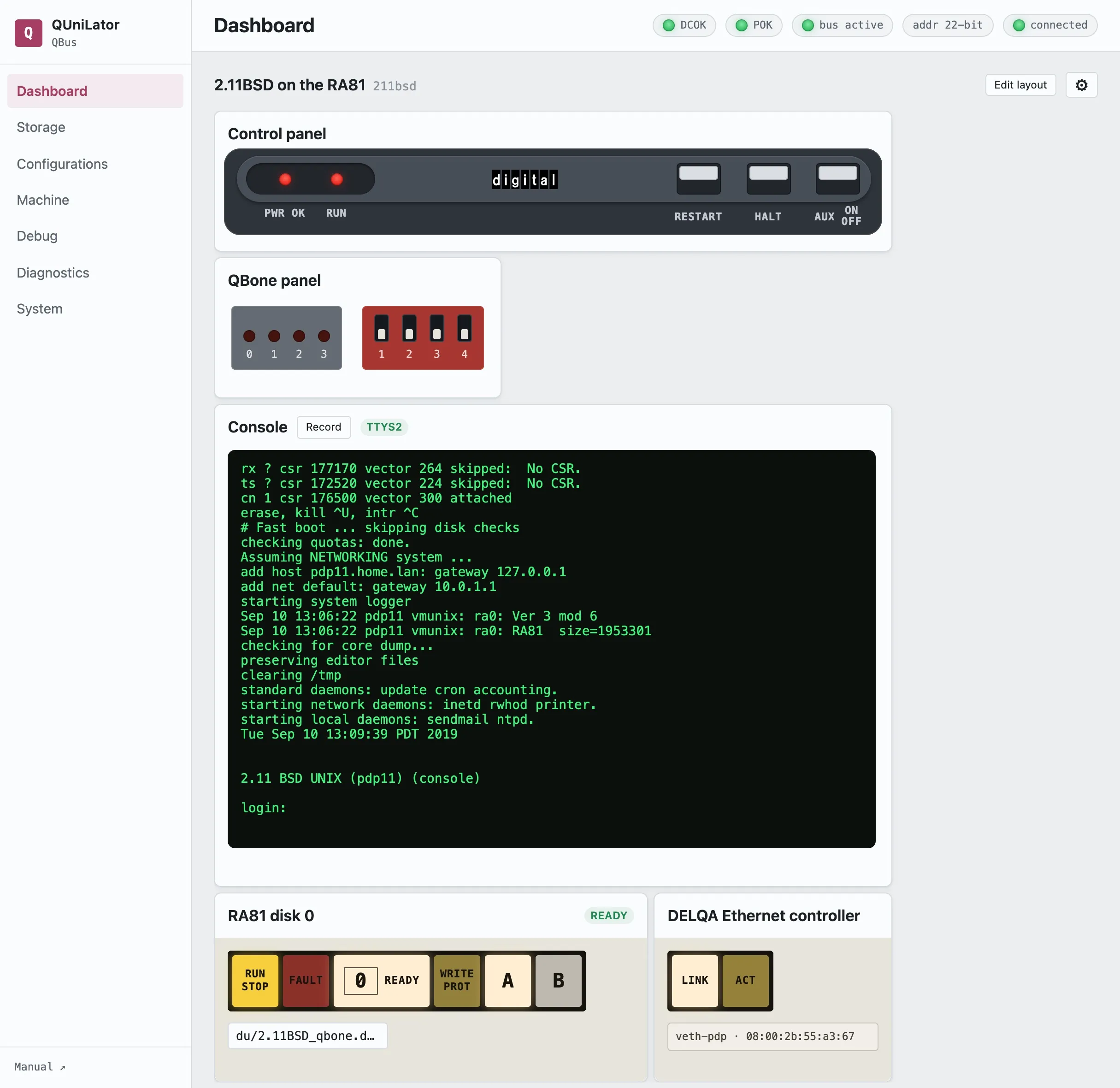
If XXDP proved the machine works, this is the one that makes it useful.
The machine
Section titled “The machine”| Processor | Real KDJ11-D (PDP-11/53) — 1.5 MB of its own memory, its own boot ROM and console line |
| Backplane | QBUS, QBone in a quad slot |
| From QUniLator | A UDA50 MSCP controller with one RA81, and a DELQA Ethernet controller |
Three devices. The processor supplies everything else.
What you need
Section titled “What you need”- A 2.11BSD MSCP disk image. The one here is
du/2.11BSD_qbone.dsk, a 1 GB volume carrying a kernel built for this machine. - A free address on your LAN, and its gateway. This walkthrough uses 192.168.2.180 with gateway 192.168.2.1 — substitute your own.
- The console line cabled and its speed set, per the XXDP walkthrough.
1. Build the machine
Section titled “1. Build the machine”On Configurations, start from default (everything off) and add three
devices:
| Device | Setting |
|---|---|
uda | the UDA50 controller, defaults are right |
uda0 | an RA81 holding du/2.11BSD_qbone.dsk |
delqa | the Ethernet controller, on interface veth-pdp |
Leave DL11 disabled — the processor has its own console.
The disk announces itself by the image’s size rather than the drive type’s, which is what lets a 1 GB volume live on a drive DEC built at 456 MB. You will see it in the boot log.
2. Switch it on and boot
Section titled “2. Switch it on and boot”Press AUX ON/OFF. The processor’s ROM counts down and finds the MSCP disk:
9 8 7 6 5 4 3 2 1
DU053Boot from ra(0,0,0) at 0172150:
The : is 2.11BSD’s boot block asking which kernel to load. Answer:
ra(0,0,0)unixThe kernel comes up and tells you what it found:
UNIX #1: Sep 10 12:20:06 PDT 2019    root@Tue:/usr/src/sys/QBONE
ra0: Ver 3 mod 6ra0: RA81  size=1953301attaching qe0 csr 174440qe0: DEC DELQA addr 08:00:2b:55:a3:67attaching lo0
phys mem  = 1572864avail mem = 1174912
Three lines worth reading. size=1953301 is the image’s block count, not an
RA81’s. qe0 is the DELQA, and its address is derived from the BeagleBone’s own
MAC, so it is unique without you choosing one. phys mem = 1572864 is the
processor’s own 1.5 MB — QUniLator supplied none of it.
You land in a single-user shell at #.
3. Point it at your network
Section titled “3. Point it at your network”2.11BSD reads its network settings from /etc/netstart and resolves its own
name through /etc/hosts. A stock image is set up for whatever LAN it was built
on, so both need repointing — after which every reboot comes up on the network by
itself.
sed -e 's/^broadcast=.*/broadcast=192.168.2.255/' \    -e 's/^default=.*/default=192.168.2.1/' /etc/netstart > /tmp/nscp /tmp/ns /etc/netstart
sed 's/^10\.0\.1\.212/192.168.2.180/' /etc/hosts > /tmp/hcp /tmp/h /etc/hosts
The second one matters and is easy to miss: netstart passes the hostname to
ifconfig, so the address the machine gets is whatever /etc/hosts maps that
name to.
netmask is already 255.255.255.0. Leave routedflags=NO alone — the file
says why, in capitals.
4. Go multi-user
Section titled “4. Go multi-user”Press Ctrl-D. netstart runs, and the daemons come up:
Assuming NETWORKING system ...add net default: gateway 192.168.2.1starting system loggerstarting network daemons: inetd rwhod printer.starting local daemons: sendmail ntpd.
2.11 BSD UNIX (pdp11) (console)
login:
5. Reach it from your desk
Section titled “5. Reach it from your desk”$ ping -c3 192.168.2.1803 packets transmitted, 3 packets received, 0.0% packet loss
$ telnet 192.168.2.180
2.11 BSD UNIX (pdp11)
login:That login prompt came off a PDP-11, over an Ethernet controller that is software, out of a disk that is a file.
What can go wrong
Section titled “What can go wrong”The boot block says : and nothing you type works | Characters are being dropped. Type slower, one at a time. |
| The drive shows capacity 0 | The image was assigned before the controller was enabled and got cleared. Assign it again. |
| Hard errors, then a corrupted filesystem | The volume is bigger than the drive type and is being truncated. Check the boot log says size= the image’s block count. |
| Multi-user hangs with the console dead | A serial mux fighting for interrupt time. Disable dzv11 if you have it enabled; this machine does not. |
ping is not found in single-user | /usr is not mounted yet. Go multi-user first. |
| Nothing on the LAN | Check the DELQA’s interface parameter names the bridged interface (veth-pdp here). The host’s own address is not reachable from a raw socket on the same NIC — the bridge exists for that. |
Save As… the configuration — this one is saved as 211bsd — and bind it to
a Power-on DIP setting so the machine boots into UNIX whenever it is
switched on.
Then try the other direction entirely: VMS on an emulated VAX, where QUniLator supplies the processor too.